SpicyChat AI Review 2026: Features, Pricing, Login, Models, Safety, and Alternatives
AI chat has changed a lot in the last few years. People don’t just want a bot that answers questions anymore. They want an AI-powered conversation platform that feels alive. That’s where SpicyChat AI comes in.
This Spicy Chat AI review 2026 looks at everything you need to know. We’ll cover how it works, what it costs, and whether it’s safe. We’ll also compare it to other AI companion platforms so you know your options. Let’s get into it.
What Is SpicyChat AI?
SpicyChat AI is an AI character platform. It lets you chat with customizable AI characters instead of one plain assistant. Think of it like a stage full of actors, and you pick who you want to talk to.
The platform runs on large language models. These models power character-driven conversations that feel natural. You can pick from a character library, or you can build your own. Either way, you get immersive AI conversations that go beyond simple Q&A.
What SpicyChat AI Is Used For
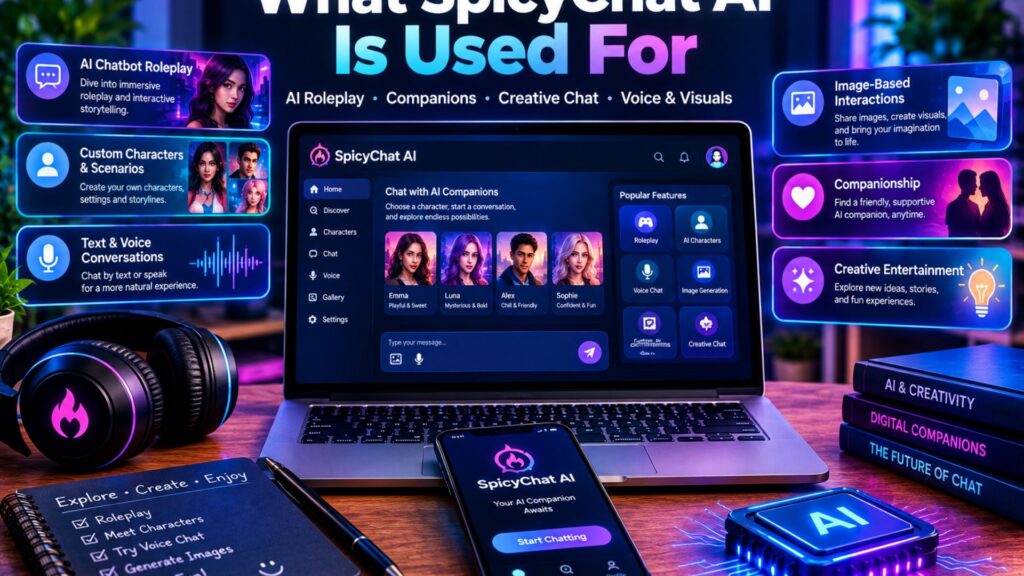
People use SpicyChat for a lot of different reasons. Some want creative storytelling. Others want practice for AI roleplay, or just someone to talk to after a long day. Writers use it to test dialogue. Gamers use it to build worlds. Some just enjoy personalized conversations with a character that remembers them.
Here’s a simple way to picture it. Say you’re writing a fantasy novel and you’re stuck on a scene. You could open SpicyChat, load a character that fits your story, and talk through the scene like a co-writer. That’s the appeal. It’s not just a chatbot. It’s a creative writing partner with a personality.
| Common Use Case | Who It’s For |
| Roleplay and storytelling | Writers, gamers, hobbyists |
| Companionship chat | Users who want a friendly presence |
| Dialogue practice | Fiction writers, screenwriters |
| Worldbuilding | Fantasy and sci-fi fans |
What Makes SpicyChat AI Different?
Most AI chatbots try to be neutral. They answer, then wait. SpicyChat AI does something else. It stays in character. The AI keeps a consistent character personality throughout your whole chat, not just for one reply.
That’s a big deal if you’ve used a generic bot before. Generic bots forget who they’re “supposed” to be halfway through a conversation. SpicyChat tries to fix that with AI memory and strict behavioral rules baked into each character. It also leans into content freedom, giving users more room to shape mature or unrestricted scenes than some mainstream AI chat platforms allow. That’s part of why it built a loyal community-created characters base so fast.
Read More About: About the Befitnatic Website: What It Really Is in 2026
How SpicyChat AI Works
So how does the magic actually happen? It’s simpler than you’d think. The platform combines a few pieces of information every time you send a message. Your input, the conversation history, the character’s rules, and any saved memory settings all blend together. The result is a generated response that sounds like it came from one consistent “person.”
Here’s the basic flow, step by step:
- You create an account and log in.
- You choose a character from the character library or make your own.
- You start a conversation, and the AI replies using system instructions and stored context.
- You manage the chat across multiple chat threads if you’re juggling more than one story.
Creating an Account
Getting started takes just a few minutes. You’ll sign up with an email, set a secure password, and confirm your address through email verification. Nothing complicated here it’s the same process you’d expect from any modern app.
Choosing a Character
Once you’re in, you’ll browse the character library. You can search by name, genre, or trait. Some people scroll for fantasy characters. Others go straight for anime characters or science fiction characters. It’s a bit like scrolling through a casting call, except every character is ready to talk the moment you tap their name.
Starting a Conversation
Every character opens with a greeting message. That first message sets the tone. From there, the AI leans on its speaking style and personality traits to keep replies consistent. You’ll notice the tone doesn’t drift much, even over a long session.
Managing Chat Threads
You’re not stuck with one story. SpicyChat lets you run separate chat threads with the same character, or with different ones. That means your fantasy epic and your casual chat don’t bleed into each other.
SpicyChat AI Login Guide
Now let’s walk through the actual SpicyChat login process, since this trips up a fair number of new users.
How to Log In
Head to the official site, click Log In, and enter your email and password. Some regions support Google sign-in too, which skips the password step entirely. If you’ve got two-factor authentication turned on, you’ll confirm a code before you’re through the door.
Creating a New Account
If you’re new, the sign-up flow is short. Enter your email, choose a password, verify your inbox, and you’re in. This SpicyChat AI login guide step matters because a weak password here is the easiest way to get your account compromised later.
Dashboard Overview
Once you’re logged in, you’ll land on your dashboard overview. Here’s what you’ll typically find:
| Section | Purpose |
| Home | Browse popular characters |
| Search | Find specific AI personalities |
| Favorites | Save favorite characters |
| Messages | Return to previous chats |
| Profile | Manage account settings |
Common Login Issues
Sometimes things don’t go smoothly. A forgotten password is the most common snag just use the reset link. Email verification delays happen too, usually clearing up within a few minutes. Browser cache issues can also cause login loops, so clearing cookies often fixes it. And if you’re using Google sign-in, make sure you’re logged into the right Google account first.
Key SpicyChat AI Features
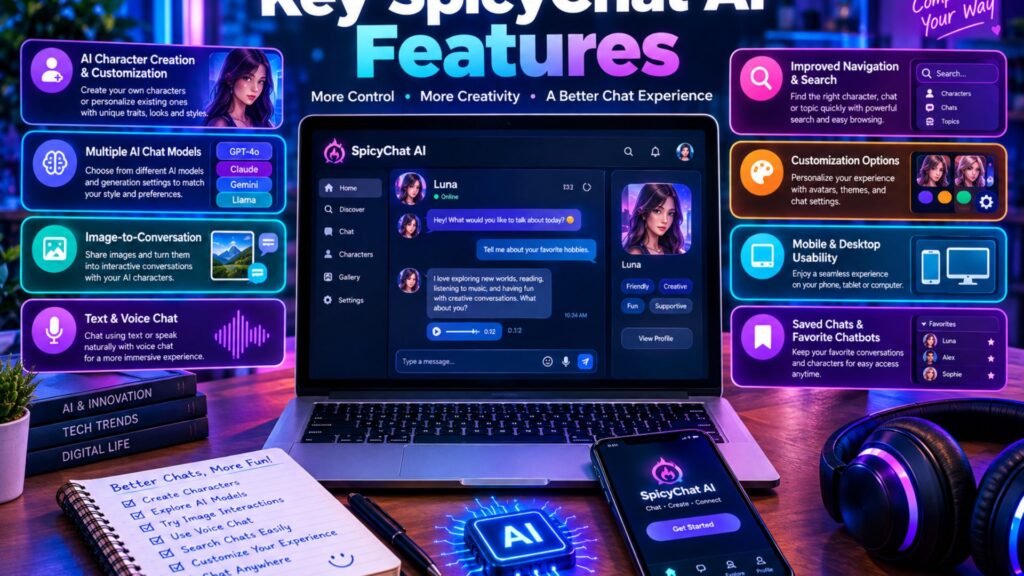
Let’s slow down and really dig into what SpicyChat AI features actually offer. This is where the platform earns its reputation.
Character Library
The character library is huge, and it keeps growing. You’ll find everything from fantasy characters to modern-day personas, all built by the community and the platform team. Browsing feels less like using an app and more like flipping through a catalog of stories waiting to start.
Create Your Own Character
Want more control? Build a custom AI character from scratch. You’ll set a background story, define speaking style, and lock in behavioral rules so the AI stays true to your vision. This is the feature that turns casual users into serious hobbyists.
Conversation Memory
Conversation memory is one of the most talked-about features on the platform. Instead of forgetting your last chat, the AI can carry details forward. Mention your favorite hobby today, and it might reference it next week, depending on your memory settings. That said, memory limitations are real. Very long conversation threads can still hit context loss, where older details fade out. It’s not perfect, but it’s a lot better than starting from zero every time.
Multiple Chat Threads
We touched on this earlier, but it deserves its own spotlight. Running multiple conversations at once means your storylines stay clean. You can pause one thread, jump into another, and come back later without anything getting jumbled.
Character Customization
Beyond the basics, character customization goes deep. You can fine-tune tone, adjust how flirty or formal a character sounds, and set specific personality traits that shape how it reacts to different topics. Power users tend to spend real time here, tweaking until the character feels “right.”
SpicyChat AI Models Explained
Not all responses are created equal, and that comes down to the AI models running behind the scenes.
How AI Models Affect Conversations
Large language models aren’t interchangeable. A faster model replies quicker but with less depth. A slower, more advanced model takes its time and produces richer, more detailed answers. Think of it like ordering fast food versus a sit-down meal both feed you, but the experience is different.
Model Selection and Availability
Here’s a general breakdown of how AI model selection tends to work on character platforms like this one:
| Model Type | Best For | Speed |
| Fast Model | Casual chats | Very fast |
| Balanced Model | Daily use | Fast |
| Advanced Model | Long-form roleplay | Slower, more detailed |
Conversation Quality and Response Differences
Switching models changes more than speed. Fast responses tend to be shorter and more generic. Advanced models produce detailed responses with better character consistency, especially during immersive storytelling sessions. If you’re serious about roleplay, it’s worth trying the advanced option at least once.
SpicyChat AI Pricing in 2026
Money matters, so let’s break down SpicyChat AI pricing.
Free Plan
The free plan covers the basics. You get limited daily usage, access to public characters, and standard AI responses. It’s enough to test the waters, but heavy users will hit the message limits pretty fast.
Premium Features
Upgrade, and you unlock higher message limits, faster responses, and access to better AI models. You’ll also get priority servers, which matters a lot during busy hours when free users experience slowdowns.
What You Get With a Paid Plan
Here’s a general look at how tiers tend to stack up:
| Plan | Message Limits | Model Access | Extras |
| Free | Limited | Basic model only | Public characters |
| Premium | Higher | Balanced and advanced | Enhanced memory, faster replies |
| Ultra | Highest | Full access | Priority servers, additional customization |
Is SpicyChat AI Worth Paying For?
Honestly, it depends on how you use it. Casual users who chat once in a while can probably stick with free. But if you’re chatting daily, or building detailed custom AI characters, the premium subscription starts paying for itself pretty quickly. The response speed alone makes a noticeable difference once servers get busy.
Is SpicyChat AI Safe?
AI safety is probably the question people ask most, so let’s take it seriously.
Privacy and Account Security
Like any online platform, SpicyChat safety comes down to good habits. Check the privacy policy before you sign up, and see what data gets collected. Turning on two-factor authentication is one of the simplest ways to lock down account security.
Data and Conversation Risks
Data handling varies by platform, and SpicyChat is no exception. Conversations may be stored for a period of time to improve AI memory and model performance. That raises normal privacy concerns shared across the whole AI companion market things like data retention, third-party service providers, and how easy data deletion actually is if you want out.
Safety Tips for Users
A few habits go a long way. Use a strong password, and don’t reuse one from another account. Avoid sharing personal information in chats, even if a character feels trustworthy. Stick to the official domain, and never enter login credentials on a site you found through a random ad or link.
Can SpicyChat Conversations Be Leaked or Hacked?
No platform is 100% immune to breaches, and it’s honest to say that upfront. Most account compromises don’t come from the platform itself getting hacked. They come from phishing risks and lookalike domains tricking users into typing their password on a fake website. As one cybersecurity trainer put it during a recent online safety session: “The weakest link is almost never the software. It’s the person clicking the wrong link.” Stay alert, bookmark the official site, and you’ll avoid the vast majority of risks.
SpicyChat AI Conversation Quality
Let’s talk about what actually matters day to day: how good the conversations feel.
Character Consistency
Character consistency is where SpicyChat tends to do well. Characters mostly stay in tone, even over longer sessions, thanks to the combination of behavioral instructions and stored context.
Memory and Context
Context retention works well for shorter sessions. Longer ones can wobble a bit, especially with memory limitations kicking in after really extended chats. This isn’t unique to SpicyChat it’s a known challenge across the whole AI companion ecosystem.
Response Quality
Response quality depends heavily on which model you’re using. Advanced models write with more nuance and better pacing. Faster models are snappier but flatter.
What Affects the Chat Experience?
A few things shape your overall experience: which model you picked, how busy the servers are, how well a character was built, and how long your messages tend to run. Short, vague prompts usually get short, vague replies. Detailed prompts get better generated responses back.
SpicyChat AI Pros and Cons
Here’s the honest breakdown.
Advantages: Strong character customization, a huge community library, an easy-to-use dashboard overview, solid conversation memory, and active development that keeps adding features.
Drawbacks: The best tools sit behind a premium subscription. Response quality can vary between models. Heavy server demand slows things down at peak hours. And some user-generated content is more polished than others, since quality depends on who built the character.
SpicyChat AI vs Popular Alternatives
SpicyChat isn’t alone in this space. Here’s how it stacks up against other names in the AI companion apps world.
| Platform | Best For |
| Character.AI | Casual, mostly PG conversations |
| CrushOn.AI | Companion-style chats |
| Candy AI | Visual, avatar-driven characters |
| DreamGF | Relationship-focused companions |
| Muah AI | Voice and companion features |
| Janitor AI | Flexible AI roleplay |
| Chub AI | User-created characters |
| SillyTavern | Advanced, self-hosted setups |
SpicyChat AI vs Character.AI
Character.AI leans more casual and keeps things PG. SpicyChat AI gives users more content freedom, especially for mature roleplay platform use cases.
SpicyChat AI vs CrushOn.AI
Both platforms focus on companionship, but SpicyChat puts more weight on character creation tools and a deeper character library.
SpicyChat AI vs Candy AI
Candy AI leans heavily on visuals and avatars. SpicyChat stays more text-focused, prioritizing conversational flow over imagery.
SpicyChat AI vs DreamGF
DreamGF narrows in on relationship simulation. SpicyChat casts a wider net, covering everything from fantasy characters to sci-fi companions.
SpicyChat AI vs Muah AI
Muah AI pushes voice features harder. SpicyChat remains a text-based AI companion experience, which some users actually prefer for privacy reasons.
Does SpicyChat AI Have a Mobile App?
Mobile access matters more than ever, so let’s cover it.
Mobile Access Options
Most character platforms, including SpicyChat, tend to lean on a responsive mobile experience through the browser rather than a dedicated native mobile app. Always check the official app stores directly to confirm current availability, since this changes often.
Using SpicyChat AI on Mobile Devices
If you’re using the mobile web design version, bookmark the page for quick access. Browser performance stays solid on most modern phones, and the responsive design adjusts well to smaller screens.
Read More About: BitClassic Applewhite Explained: Complete Honest Guide 2026
Frequently Asked Questions
Is SpicyChat AI safe to use in 2026?
It operates as a legitimate AI chat platform, but you still need good habits, strong passwords, two-factor authentication, and caution around unofficial websites.
How much does SpicyChat AI cost in 2026?
There’s a free plan with limited daily usage, plus paid tiers that unlock higher message limits and better AI models.
How do I log in to SpicyChat AI?
Visit the official site, enter your email and password, or use Google sign-in if your region supports it.
What models does SpicyChat AI use?
The platform offers a range from fast, lightweight models to advanced models built for detailed responses.
Does SpicyChat AI have conversation memory?
Yes. Conversation memory lets characters recall details from past chats, depending on your settings.
Has SpicyChat AI improved its memory?
The platform has continued refining memory performance over time, though long conversation threads can still face some context degradation.
Can SpicyChat AI conversations be leaked or hacked?
Most risks come from phishing risks and weak passwords rather than platform-side hacks. Good online security habits reduce that risk significantly.
What are the best SpicyChat AI alternatives?
Character.AI, CrushOn.AI, Candy AI, DreamGF, Muah AI, Janitor AI, Chub AI, and SillyTavern are the main chatbot alternatives worth comparing.
Is SpicyChat AI worth paying for in 2026?
For daily users, yes. The subscription value shows up fast through faster responses and enhanced memory.
Conclusion
SpicyChat AI stands out in a crowded AI companion market because it commits fully to character-driven conversations. The character customization, conversation memory, and growing community-created character base make it one of the stronger options for anyone chasing immersive roleplay rather than plain Q&A.
It’s not flawless. Free users will bump into limits fast, and memory limitations show up in very long sessions. Still, for creative writers, roleplay fans, and anyone craving personalized conversations, SpicyChat AI earns its spot on the shortlist. Start with the free tier, see how it feels, and upgrade once you know it fits the way you actually chat.